
Administration Privileges
Granting Administration Privileges
In Beegle, the role allocated to a user does not impact what parts of Beegle and features they have access to. This is managed by the administration privileges which can be turned on or off for each user,user. per
To manage a users administration privileges:
- Go to settings using the
following
video:icon
in the top right.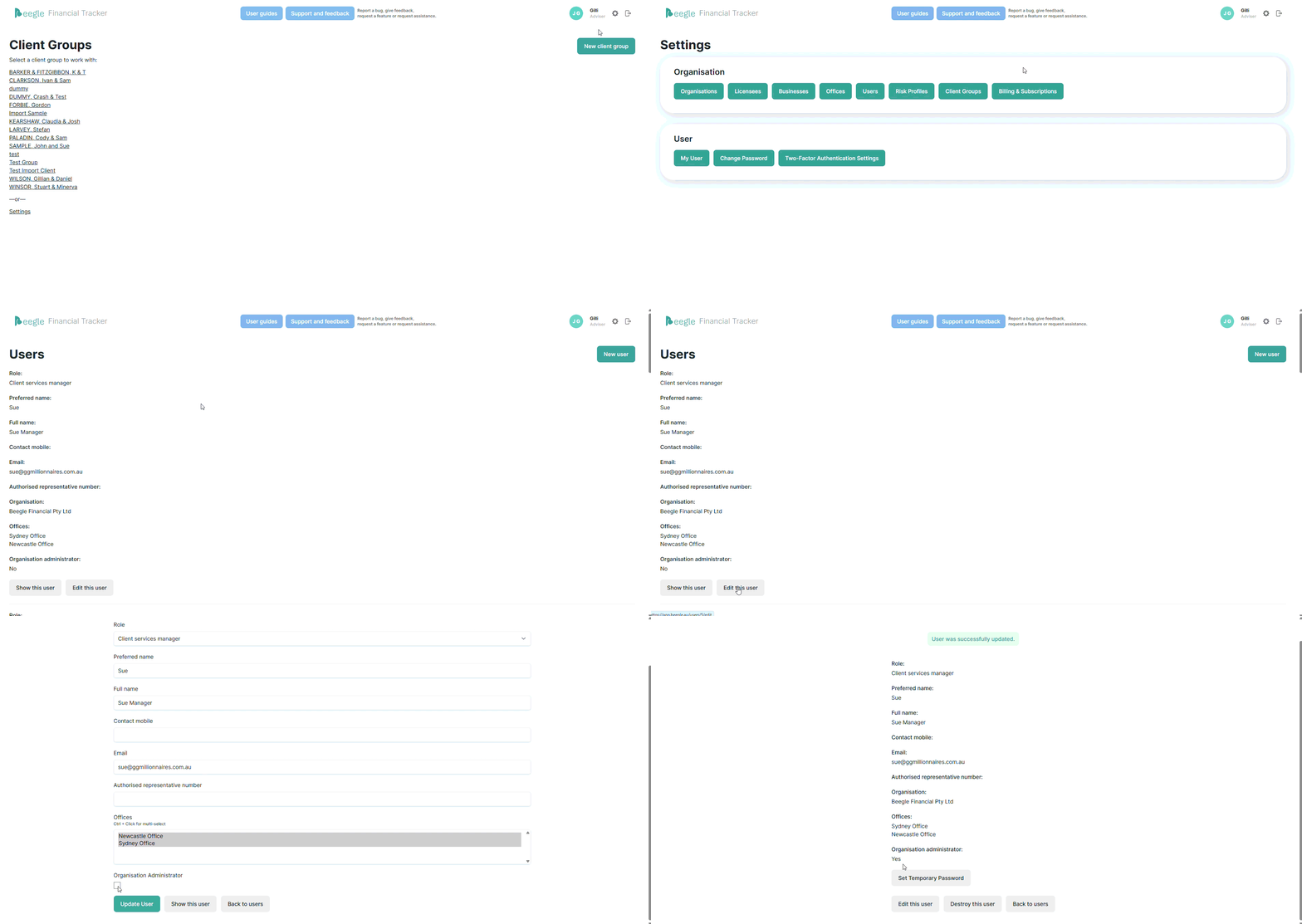
- Click 'Users' under the Orgnaisation settings.
- Find the user you want to edit and select 'Edit this user'
- Toggle the 'Organisation Administrator' option
- Click 'Update User'

Only users with administration privileges can change this setting.
What does Administration Privileges Allow
Following is a list of privileges and access granted to administration users only:
- Access to all client groups
- Regardless whether the user has been specifically excluded from viewing a client group, they will be able to access all clients.
- The reason for this is due to administration users typically holding a management role within the Financial Planning business and therefore needs oversight and reporting across all client groups.
- Access to Billing & Payments
- Only administration users will be able to see the Billing & Subscriptions page, and consequently have access to managing billing and payment details via the Stripe portal.
- User Management
- Although all users can manage their own details, an administration user can manage the details of all users.
- A user without administration privileges cannot give such privileges to themselves. Only a user currently holding administration privileges can assign and revoke them.
- Someone without administration privileges can view other users, but not edit them.
- Only an administration user can add new users. The process is noted here.
- Only an administration user can delete users. The process is noted here.
- Administration users can reset passwords for others. The process is noted here.
- Subscription management
- Only an administration user can activate and manage a subscription for a client group.
- The reason for this is due to the cost incurred to the business and therefore limiting the responsibility to those who are in a position to make such decisions for the business.
- Details on managing subscriptions can be found here.
- Organisation level settings
- In general, all users can view the organisation level settings and details. However, only an administration user can edit them.
- Integrations
- Integrations at the organisation level can only be managed by administration users.
- Other users can set up and link the Beegle client groups with integration providers once they are set up at the organisation level.